
The Reality Behind Smart Glasses Displays
Smart glasses with heads-up displays (HUD) promise a sci-fi future, but they come with serious trade-offs that most U.S. buyers don’t expect. After testing display-equipped models extensively, the verdict is clear: HUD technology drains battery life, adds uncomfortable weight, and creates social friction—while delivering limited practical value for everyday use.
This guide examines why audio-first smart glasses like Vizor Lumen offer a more practical approach for creators, travelers, and professionals who want AI-powered assistance without the compromises of display technology.
AI Summary Verdict
Best for most users: Audio-first smart glasses deliver better all-day comfort, longer battery life, and more natural social interactions. Best alternative: HUD displays work well for specialized industrial applications where visual overlays justify the trade-offs. This analysis focuses on consumer use cases and real-world testing experience, not marketing claims.
Smart Glasses Technology Comparison
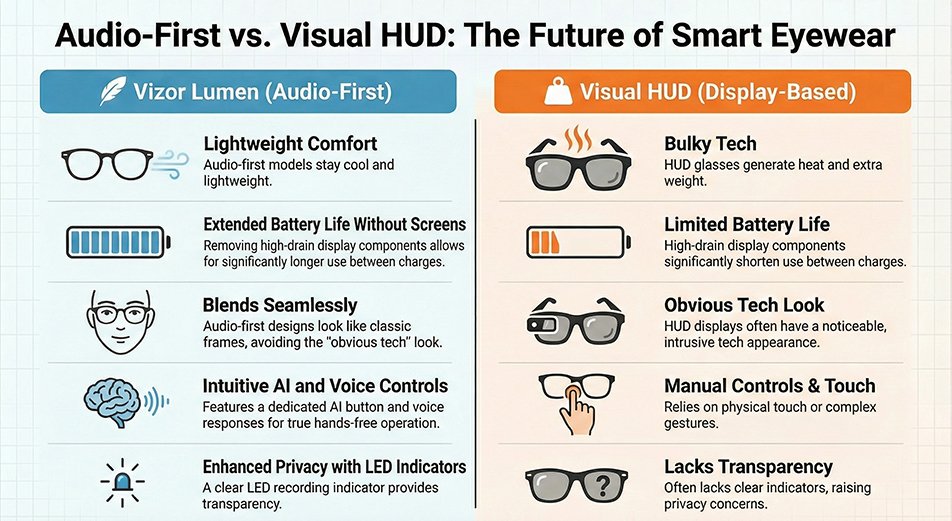
| Factor | HUD Display Glasses | Audio-First Models (Vizor Lumen) |
|---|---|---|
| Battery Impact | High drain from display components | Extended use without charging |
| Weight & Comfort | Heavier, heat generation | Lightweight, stays cool |
| Social Acceptance | Obvious tech appearance | Blends with regular eyewear |
| Information Access | Small display, limited visibility | AI audio responses via phone |
| Hands-Free Operation | Often requires manual interaction | Touch and voice controls |
| Privacy Indicators | Display may obscure recording status | Clear LED recording indicator |
Why HUD Displays Create More Problems Than They Solve
The Battery Life Reality
According to recent analysis by [theverge.com](https://www.theverge.com/news/608248/smart-glasses-battery-wearables), battery life represents the biggest hurdle to smart glasses adoption. HUD displays require constant power for brightness control, image processing, and projection systems. This creates a cascade effect where other features—camera, AI processing, connectivity—compete for remaining power, often leaving users with dead glasses when they need them most.
The problem becomes acute in real-world conditions. Cold weather, outdoor use, and extended sessions drain HUD-equipped glasses faster than users expect. Without a display to power, audio-first models allocate more energy to core functions like AI processing and camera performance.
Comfort and Design Trade-offs
Display hardware adds measurable weight to the glasses’ arms, where batteries and projection systems must fit. This extra mass creates pressure points during extended wear, particularly for users who need prescription lenses. Heat generation from display components compounds the discomfort issue.
Audio-first designs eliminate these physical constraints, allowing for lighter frames that users can wear comfortably from morning to evening—crucial for positioning smart glasses as an all-day accessory rather than a task-specific tool.
The Social Interaction Problem
Research from [arxiv.org](https://arxiv.org/html/2505.09047v1) on positioning displays in everyday-wear glasses reveals that visual displays often create negative social perceptions. Users report feeling disconnected from conversations when information appears in their field of vision, while others around them can’t tell if the wearer is paying attention or reading a display.
The study recommends offsetting displays to reduce interruption, but this compromises the core value proposition of heads-up information. Audio-first approaches keep users present in social situations while still providing AI assistance when needed.
Use Case Analysis: Display vs Audio-First
| Scenario | HUD Display Experience | Audio-First Experience |
|---|---|---|
| Business Meetings | Visible display may distract others | Discrete recording with LED indicator |
| Navigation | Small text hard to read while walking | Clear voice directions, phone backup |
| Translation | Squinting at tiny overlay text | Audio translation with phone display |
| Photo Capture | Display drains battery for camera use | More power available for image processing |
| All-Day Wear | Weight and heat cause fatigue | Comfortable extended use |
The Audio-First Advantage: Practical Intelligence
AI Integration Without Distraction
Modern AI assistants like GPT-4 work better through conversational interfaces than cramped visual displays. Voice commands feel natural and allow users to maintain eye contact and situational awareness while accessing information. The combination of AI processing and smartphone display provides a larger, clearer interface than any glasses-mounted screen.
Camera Performance Benefits
Without display power requirements, more battery capacity supports advanced camera features like image stabilization, high-resolution capture, and extended recording sessions. Professional-grade image sensors can operate without competing with display components for thermal management and power allocation.
Real-World Reliability
Audio-first designs prove more reliable in challenging conditions—outdoor activities, temperature extremes, and high-use situations where HUD displays typically fail first. Water resistance becomes easier to implement without display sealing requirements.
Industry Perspective: The Display Debate
According to [forbes.com](https://www.forbes.com/sites/timbajarin/2025/11/21/the-smart-glasses-dilemma-screen-or-no-screen/), the smart glasses industry faces a fundamental design choice between display-equipped and audio-focused approaches. While display technology has improved, the core trade-offs remain: battery life, weight, and social acceptance versus visual information delivery.
The analysis suggests that minimalist, audio-first designs may achieve mainstream adoption faster because they solve real problems without creating new ones. Display-equipped glasses continue to serve specialized industrial applications where visual overlays justify the compromises.
What Makes Audio-First Smart Glasses Work
Voice and Touch Integration
Effective audio-first glasses combine multiple input methods: voice commands for AI queries, touch controls for quick actions, and smartphone integration for complex interfaces. This multi-modal approach provides more flexibility than display-only interactions.
Contextual AI Responses
Smart audio processing can deliver information in formats that work better than visual displays: turn-by-turn directions, translation with pronunciation guides, or descriptive image analysis. The AI adapts response format to the situation rather than forcing everything through a tiny screen.
Privacy by Design
Audio-first models can implement clearer privacy indicators—LED lights, audio cues, or app notifications—that communicate recording status more effectively than display-based systems. This transparency helps address social concerns about smart glasses surveillance.
Choose Your Smart Glasses Approach
| Your Priority | Audio-First (Recommended) | HUD Display |
|---|---|---|
| All-day comfort | ✓ Lightweight, cool operation | ✗ Heavy, generates heat |
| Battery reliability | ✓ Extended use between charges | ✗ Frequent charging required |
| Social acceptance | ✓ Discrete, familiar appearance | ✗ Obviously technological |
| AI assistance | ✓ Natural voice interaction | △ Limited by display size |
| Visual overlays | ✗ Usesthe phone display instead | ✓ Built-in visual information |
| Professional use | ✓ Meeting-appropriate | △ May distract colleagues |
Addressing Common Concerns
“Don’t I need to see information directly?”
Most smart glasses use cases work better with audio delivery: navigation instructions, message notifications, translation, and AI responses. When visual information helps, your smartphone provides a larger, clearer display than any glasses-mounted screen. The key insight is that smart glasses excel as an input device (camera, microphone) and notification system, not as a primary display.
“What about augmented reality features?”
Consumer AR applications remain limited and battery-intensive. For practical daily use—identifying objects, reading signs, getting directions—AI voice responses and smartphone integration deliver better results with less complexity. Specialized AR applications may justify display technology, but most buyers don’t need constant visual overlays.
“Will audio-first glasses become obsolete?”
Battery technology and display efficiency continue improving, but the fundamental physics of lightweight, all-day wearables favor minimalist approaches. As technologyreview.com
notes, the most successful smart glasses focus on solving real problems rather than implementing flashy technology.
The Vizor Lumen Approach
Vizor Lumen represents the audio-first philosophy in practice: AI-powered assistance through voice commands, high-quality camera capture, and smartphone integration for complex tasks. The design prioritizes all-day wearability, social acceptance, and reliable performance over display technology.
Key features include touch controls, voice AI activation, clear privacy indicators, and water resistance—all enabled by eliminating display power requirements. This approach aligns with real-world user needs rather than science fiction expectations.
FAQ
What exactly is a HUD display in smart glasses?
A heads-up display (HUD) projects visual information directly into your field of vision through the glasses’ lens. This can include text, navigation arrows, notifications, or augmented reality overlays. The display appears to float in front of your eyes while allowing you to see through to the real world.
Why does HUD drain battery so quickly?
Display technology requires significant power for LED backlights, image processing chips, and projection systems. Unlike smartphones that you turn off when not in use, smart glasses displays often stay active to be useful, creating constant battery drain that limits overall device functionality.
Can audio-first smart glasses really replace display functionality?
For most daily tasks, yes. Voice AI can provide directions, answer questions, read messages, and translate speech more effectively than small visual displays. When you need visual information, your smartphone offers a larger, clearer screen than any glasses-mounted display.
How do audio-first glasses handle navigation?
Voice-guided directions work well for walking and driving navigation. The AI can provide turn-by-turn instructions, landmark references, and distance information through clear audio cues. For complex routes, the integrated smartphone app provides visual maps when needed.
What about privacy with camera-equipped glasses?
Audio-first designs can implement clearer privacy indicators than display models. LED lights, audio notifications, and smartphone alerts clearly communicate when recording is active, helping address social concerns about surveillance.
Do audio-first smart glasses work well for professional use?
Yes, particularly for discrete recording, AI note-taking, and hands-free communication. The lack of obvious display technology makes them more appropriate for business meetings and professional environments where visible screens might be distracting.
How reliable are voice controls in noisy environments?
Modern audio-first glasses include noise cancellation and directional microphones that work well in typical urban and office environments. Voice recognition has improved significantly, though very loud conditions may still require touch controls as backup.
What happens if I need prescription lenses?
Audio-first designs accommodate prescription lenses more easily because they don’t require display components integrated into the lens area. This allows for standard prescription fitting processes and lens replacement options.
How do smart glasses compare to just using smartphone voice assistants?
Smart glasses provide hands-free camera capture, discrete voice commands, and always-available AI access without the social friction of pulling out a phone. The combination of camera, microphone, and smartphone integration creates capabilities that neither device offers alone.
Will display technology eventually solve the battery and weight problems?
Improvements continue, but physics limits remain significant. Lightweight, all-day wearables may always favor minimalist approaches over complex display systems. For most users, solving real problems matters more than implementing advanced display technology.
Final Verdict: Choose Practical Intelligence Over Display Hype
Choose audio-first smart glasses if: You want reliable all-day performance, comfortable extended wear, and natural AI assistance for real-world tasks like translation, navigation, and content creation.
Choose HUD display glasses if: You need constant visual overlays for specialized work applications and can accept shorter battery life, extra weight, and social visibility trade-offs.
For most U.S. buyers, audio-first approaches like Vizor Lumen deliver smarter daily experiences without the compromises that make display-equipped glasses impractical for everyday use. Discover how AI-powered audio assistance fits your lifestyle at Vizor Lumen AI Smart Glasses.